
🧱 Technology, Administration, and Reliability
Audience: Org Admin, Data Admin, System Admin, Deployment Administrator, Developer, Support
Related: Feature Catalog · Database Administration · API Tester and Postman · Performance and Job Status
Blackcap's everyday features are backed by a substantial administration, diagnostics, data, and deployment foundation. These capabilities are not ordinary household workflows, but they make Blackcap safer to operate, easier to support, and practical to run on either a Raspberry Pi or GCP.
Access remains permission-aware. System-wide diagnostics and repair actions are restricted to System Admins, while organization and data tools remain limited to the roles that need them. The application continues to enforce organization scoping and endpoint permissions even when a technical page is visible.
Architecture at a glance
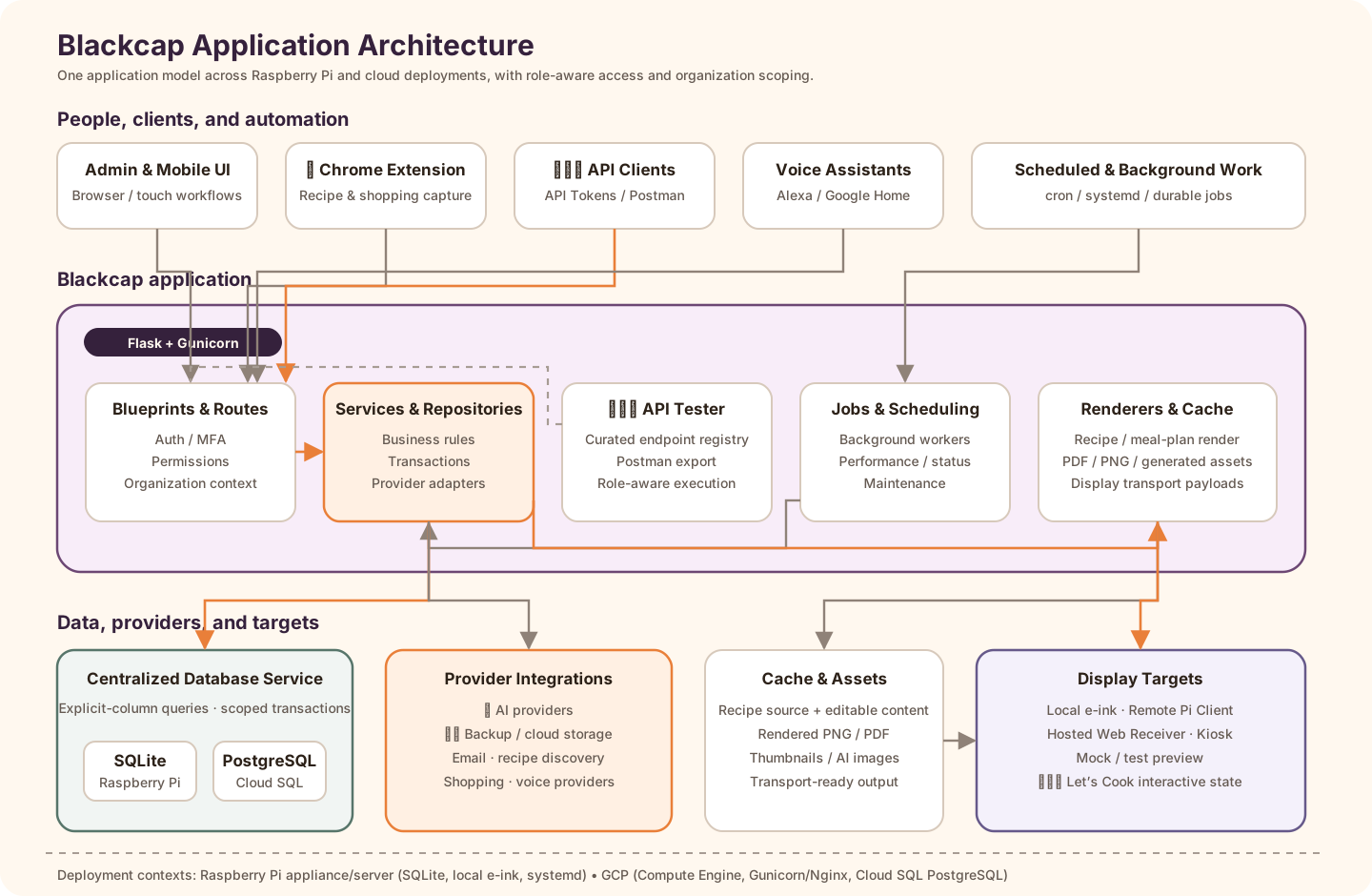
Blackcap keeps user interfaces, API clients, background work, persistence, provider integrations, and display delivery behind one permission-aware application model. The same architecture supports a Raspberry Pi appliance/server and a GCP deployment while allowing provider-specific database and infrastructure behavior where it is genuinely required. For implementation boundaries and route ownership, see Application Architecture.
🔐 Organizations, permissions, and security
- Organizations are the primary tenant boundary for recipes, meal plans, shopping lists, inventory, displays, configuration, and activity.
- Role and permission checks distinguish System Admin, Org Admin, Data Admin, contributor/operator, and ordinary-user responsibilities.
- Internal login supports invitations, password reset, TOTP MFA, recovery codes, trusted browsers, and organization MFA policy.
- User-owned API Tokens are named, organization-aware credentials with show-once secrets, revocation, access attribution, and retention.
- CSRF protection, safe external fetch rules, request validation, encrypted or masked secrets, and audit records protect administrative workflows.
🗄️ Database Administration
Database Admin is a provider-aware technical workspace for both SQLite and PostgreSQL deployments. Depending on permission and provider, it includes:
- resource exploration with explicit relationships and organization context;
- schema export and provider-aware metadata;
- saved queries and guarded SQL Console behavior;
- data-problem detection, maintenance actions, and reconciliation tools;
- restore and repair diagnostics;
- database parity and schema-verification support; and
- controls that keep live writes separate from read-only inspection and audit work.
See Database Administration for the full resource, maintenance, SQL Console, and repair model.
🧑💻 API Tester and API Tokens
API Tester opens against the current Blackcap instance and uses the registered route inventory rather than a disconnected static list. It supports:
- role-aware endpoint visibility and execution;
- the current authentication and organization context;
- sanitized request and response examples;
- option and identifier resolution for supported parameters;
- endpoint testing without requiring separate API software; and
- Postman export for broader integration development.
API Tester complements personal API Tokens. It does not bypass endpoint permissions, organization scoping, CSRF requirements, or token policy. See API Tester and Postman and API Development.
🖥️ System diagnostics and actions
The System page provides a deeper operational view than the quick About summary. Its capabilities include:
- application version and build identity;
- display mode, busy state, project/configuration paths, recipe count, and cloud-backup connection status;
- detected host, detection source, operating system, architecture, hardware model, container status, and Raspberry Pi capability hints;
- current uptime and recent reboot history with cautious reason confidence;
- bounded log viewing from fixed sources with severity/search filters and secret redaction;
- tracked Direct SQL Audit jobs for finding application code that bypasses the centralized database service;
- read-only Database Parity / Schema Verification and separately confirmed repair of registered safe additive gaps;
- e-ink refresh, render, deep-clean, and last-output diagnostics when attached hardware is available; and
- configuration export without exposing secret values.
Long-running audits are background jobs with queued/running/completed/failed state, progress, duration, and downloadable or inspectable results instead of blocking the page.
📊 Performance and background jobs
Blackcap records operational timing and job state so administrators can distinguish a slow request, a queued task, a provider delay, and a physical display refresh. Technical visibility includes:
- request and task duration trends;
- queue time, execution time, resource snapshots, and slow-request review;
- render and display-delivery phases;
- backup, email, purge, external-list, and provider timing;
- failed, retryable, reviewed, ignored, stale, and stoppable background work; and
- regression-to-regression performance comparisons.
See Performance and Job Status and Background Jobs.
☁️ Backups, restore, and managed maintenance
Blackcap supports local and connected cloud backup destinations, provider-aware backup scope, restore staging, validation, rollback safety, retention, and cache reconstruction. The SQLite database can be included in a Pi backup, while GCP/PostgreSQL deployments keep Cloud SQL backup responsibility at the platform boundary.
Application startup and managed schedules also support idempotent database migrations, periodic backups, display-content refresh, Menu refresh, regression continuation, data purge, GeoIP updates, Let’s Cook watchers, and enabled panel maintenance. See Backups and Restore and Background Jobs and Schedules.
🧹 Data retention and cleanup
Data Cleanup applies domain-aware retention instead of issuing generic table deletes. Administrators can use dry-run and real-run workflows for generated artifacts, completed jobs, audit history, display assignment batches, recipe-share history, Let’s Cook detail/summary records, restore staging, and other bounded operational data.
Retention rules preserve active dependencies and organization boundaries. See Data Retention and Purge.
🧪 Regression testing and safe diagnostics
Blackcap includes an administrative regression harness for immediate, scheduled, resumable, and diagnostic-clone runs. Coverage can include role behavior, integrations, display assignment, database/service checks, and the same Direct SQL Audit and Database Parity / Schema Verification jobs exposed on System.
Diagnostic clones allow isolated reproduction without modifying the source organization. See Regression Testing and Diagnostic Clones.
📜 Audit, access, and support visibility
Technical administration also includes activity history, login and API Token access, display access breadth, voice activity, configuration changes, support-request diagnostics, country-level GeoIP lookup, and privacy-conscious instance reporting. These surfaces are designed to support troubleshooting without exposing raw secrets or unnecessary personal data.
See Audit, Access Activity, and Logging, GeoIP and Access Location, Support Requests, and Instance Reporting.
🚀 Deployment foundation
Blackcap maintains two primary server paths:
- Raspberry Pi: SQLite by default, optional attached e-ink hardware, stunnel TLS, systemd services, managed schedules, and optional Remote Pi Client behavior.
- GCP: Compute Engine, Cloud SQL PostgreSQL, Cloud SQL Auth Proxy, Gunicorn, Nginx, HTTPS certificates, managed services, and browser or remote-client display delivery.
Customer deployments can also be delivered through Microwave Pie Packages. A Package is associated with one Microwave Pie License and one intended installation, while the reusable Application Release behind it can be either Source / uncompiled or Compiled. Both package formats install immutable release provenance including the exact full Git SHA, deployment mode, platform, Package/Release references, and the application version. The signed License remains the application-use entitlement; the Package controls delivery/provenance and does not replace licensing.
Package-managed installations expose System → Blackcap Updates to System Admins. Every accepted normal heartbeat from the Microwave Pie software delivery and instance management service includes the normalized update decision, which Blackcap consumes immediately with no separate time-based suppression or second automatic candidate request. When an approved newer release exists, the application surfaces Update Available in the shared UI/header and update panel. Check for Updates can force a live refresh at any time. Discovery and notification are informational only: Blackcap never forces an update, downloads it, prepares it, or restarts automatically. The administrator explicitly progresses through Check → Prepare → Apply Update and Restart, with live preparation/application status and a locally retained Previous known-good release for compatible rollback. Source installations stay Source and Compiled installations stay Compiled through this workflow.
The application uses a centralized database service, provider-aware repositories, organization scoping, idempotent migrations, and shared background-job infrastructure so the deployment paths remain behaviorally aligned. See Platform Stacks and Raspberry Pi Hardware, Packaged Distribution, and Application Updates.
More information
- Feature Catalog — Browse every currently implemented product and technical capability.
- Configuration — Understand platform, organization, and display-specific configuration scopes.
- Database Administration — Inspect provider-aware data and maintenance tools.
- API Tester and Postman — Test registered endpoints against the current instance.
- Performance and Job Status — Review operational timing and background work.