
Application Architecture
Audience: Developer, Deployment Administrator, Support Related: Database Service · Sqlite And Postgresql · Background Jobs · Api · Security And Scoping
Blackcap is a modular Flask application served by Gunicorn. Feature blueprints route requests to services and repositories; the centralized database service and provider adapters support SQLite and PostgreSQL. Background jobs, scheduled operations, provider integrations, recipe cache artifacts, the Chrome Extension, display receivers, and Raspberry Pi clients form the main runtime boundaries.
inky_admin/inky_admin_app.py remains the application bootstrap and compatibility layer. New feature logic belongs in focused blueprints, services, repositories, renderers, and utilities rather than in the bootstrap module.
Architecture overview
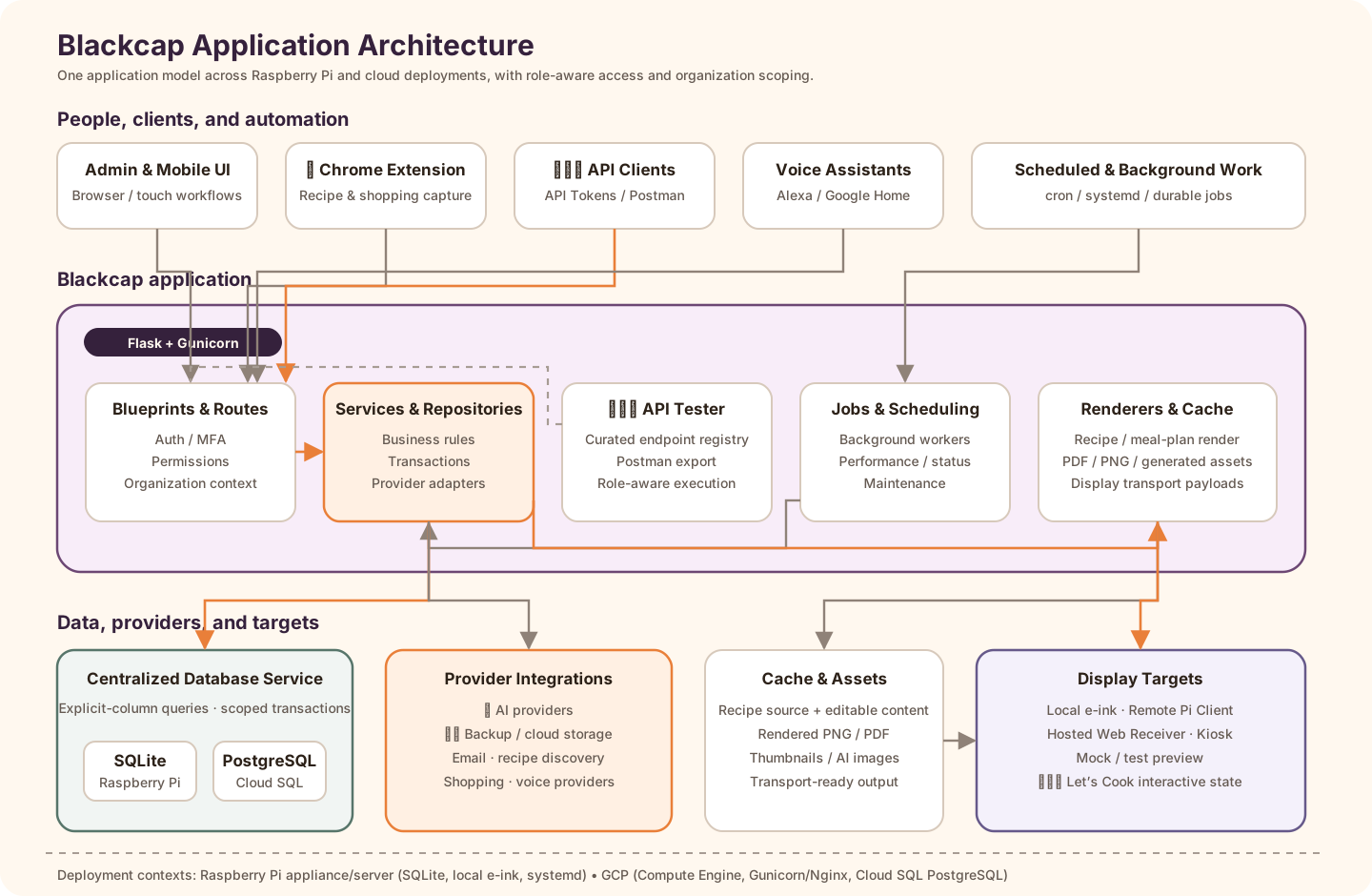
The diagram shows the major runtime boundaries rather than every internal module. Browser and extension clients enter through Flask Blueprints and the same authentication, permission, and organization-context rules. Services and repositories own business behavior; the centralized database service provides the SQLite/PostgreSQL persistence boundary; background jobs and renderers handle asynchronous work and generated artifacts; provider integrations stay behind focused services; and display output can target local e-ink, remote Raspberry Pi clients, hosted receivers, kiosks, or mocks.
The 🧑💻 API Tester sits inside the application boundary. It uses a curated endpoint registry and the same application permissions as normal calls, and its Postman export provides a controlled way to exercise API-token and selected session-authenticated endpoints without creating a separate API implementation.
Current platform model
Blackcap is a modular, organization-aware application with:
- Flask Blueprint route ownership;
- service-oriented business logic;
- repository and centralized database-service persistence boundaries;
- supported SQLite and PostgreSQL providers;
- durable background jobs and managed scheduled operations;
- role-aware administration and organization isolation;
- internal authentication/MFA plus external authentication providers;
- provider integrations for storage, email, AI, voice, shopping, and search;
- browser, kiosk, hosted receiver, local e-ink, and remote Pi display targets.
Database providers
SQLite is the default Raspberry Pi/appliance database. PostgreSQL is the supported GCP database, normally reached through Cloud SQL Auth Proxy. Application features use shared service/repository interfaces while provider adapters handle placeholder, transaction, type, metadata, pooling, maintenance, and schema differences.
Do not describe PostgreSQL as future-only. Both providers are current supported paths, although individual maintenance actions and low-level database features remain provider-specific.
UI architecture
Admin UI
Admin provides richer management and operational workspaces such as Resource Explorer, Maintenance Center, SQL Console, configuration, organizations/users, Recipe Library, Meal Planner, displays, API Tester, Performance, and Job Status.
Mobile UI
Mobile provides touch-focused recipe, shopping, Recipe Discovery, Meal Planner, display, Let’s Cook, and account workflows against the same services and organization/permission rules.
Key concepts
Resources
Operational entities include recipes, editable content, ingredients, meal-plan settings/slots/entries, shopping lists, inventory, displays, assignments, Let’s Cook sessions, users, organizations, settings, jobs, provider connections, and cache/asset metadata.
Actions
Operational workflows include import/capture, create/update/archive/purge, cache and index rebuild, display assignment and restore, provider synchronization, backup/restore, audits, maintenance, and regression execution.
Planning workflows
Meal Planner follows the same modular pattern as the newer Admin/Mobile features: Blueprint routes stay thin, services own business rules, and database writes go through centralized DB/service helpers. Admin can offer a richer calendar workspace, while Mobile uses a smaller touch-first flow against the same API/service layer.
Authentication and MFA
Blackcap keeps internal/password login as the local recovery-safe baseline while supporting external login through a registry/service model. Platform authentication-provider credentials live under Configuration → Platform → Authentication Providers, organization enablement lives under Configuration → Organization → Login Providers, and user identity links point to the same Blackcap users and permission model.
Blackcap MFA uses TOTP, recovery codes, and optional trusted-browser tokens. Organization-required MFA applies to internal/password login; user-enabled MFA can also protect externally linked accounts unless the provider reports that MFA was already satisfied for that login. Admins can clear trusted-browser tokens without resetting enrollment. Kiosk receiver and remote display-client token routes remain outside the normal browser-user MFA flow.
Organization awareness
Organization scoping, Active Organization context, organization settings, provider policy, MFA policy, scoped maintenance, and role capabilities are current application requirements—not only future SaaS considerations. System Admin platform access and support context switching must not weaken feature-level organization isolation.
AI administration and reporting boundary
AI provider orchestration and AI Seed accounting remain in the centralized AI repositories/services. UI routes do not calculate balances or write ledger rows directly. The dedicated AI Usage page and GET /api/admin/ai/usage both call ai_usage_reporting_service, which resolves authorized organizations/users before applying server-side filters, summary aggregation, stable ordering, and paging. Non-System Admin read models are stripped of provider request/token diagnostics before templates or APIs receive them.
Database Admin exposes System Admin-only AI resources for inspection, but normal provider, entitlement, balance, reservation, settlement, and candidate changes must continue through the AI domain services. See AI Administration, AI Seeds, and Usage Reporting.
Blueprint route organization
The Flask route-ownership migration is complete: active route decorators live in inky_admin/blueprints/, while inky_admin/inky_admin_app.py owns app startup/bootstrap and shared legacy helper state during the next service-extraction phase.
Static audit result
App route decorators in inky_admin/inky_admin_app.py: 0
Total Blueprint route decorators: run `python3 tools/audit_blueprint_routes.py` for the current count
Route ownership by Blueprint
admin_pages.py             10 routes   Admin page shells/navigation pages
auth.py                     2 routes   Login/logout
background_operations.py    varies     Canonical Job Status routes, legacy Background Operations redirect, job actions
performance.py              varies     System Admin Performance metrics dashboard, graph data, live resource snapshot
cloud_backup.py            15 routes   Backup, restore, OAuth, provider connection/download actions
core.py                     2 routes   Health and favicon
display_actions.py          6 routes   Display mode, refresh, restore/return-to-default, multiplier, reset
emoji_cache.py              4 routes   Emoji support/validation/cache rebuild
extension_api.py            3 routes   Chrome extension API and token regeneration
mobile_recipe_actions.py    8 routes   Mobile add/render/photo/PDF actions
recipes.py                 15 routes   Recipe library APIs/actions/cache status
settings_actions.py         5 routes   Settings, translations, Noun Project test
shopping_lists.py          19 routes   Recipe cart, shopping lists, mobile shopping
status_media.py             6 routes   Status/about/preview/media images
Verify locally
Run:
python3 tools/audit_blueprint_routes.py
Expected ending:
OK: route ownership is in Blueprints.
What remains by design
inky_admin_app.py is still large because many shared helpers and runtime objects remain there temporarily. That is intentional. The route migration is finished; the next architectural phase is gradual service extraction, one feature area at a time.
System Admin operational pages
Two System Admin operational dashboards are intentionally linked and should remain routed through blueprints rather than inky_admin_app.py:
| Page | Canonical route | Legacy / related routes | Blueprint | Purpose |
|---|---|---|---|---|
| Performance | /admin/performance |
graph/resource endpoints under the Performance blueprint | performance.py |
Trend, duration, queue wait, failure-rate, display/render, email, backup/restore, slow-request, and resource metrics. |
| Job Status | /admin/job-status |
/admin/background-operations remains a page redirect; job actions use canonical /admin/job-status/jobs/... routes |
background_operations.py |
Current queue state, active failures, stale running jobs, ignored/reviewed state, safe job actions, and job detail modals. |
New navigation and documentation should use /admin/job-status. Keep /admin/background-operations only as a backward-compatible redirect for old links and patches.
Performance and Job Status cross-link by organization, time window, job family, and status where practical:
- Performance metric panels link into Job Status when the user needs to inspect or action current/failed jobs.
- Job Status family cards and tab headers link back to Performance Graphs when the user needs trend context.